
Walk inside immersive audio
PeachyMango Audio Room for Apple Vision Pro · TestFlight beta
If the beta is full or the build has expired, check back later or support on Patreon.
PeachyMango Audio Room is in development, not yet on the App Store. Try the public TestFlight at https://testflight.apple.com/join/naJTfPMe.
Open a Dolby Atmos master. Stand inside it. Walk up to the vocal, or that synth that used to live only in your headphones.
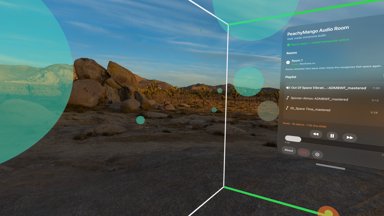
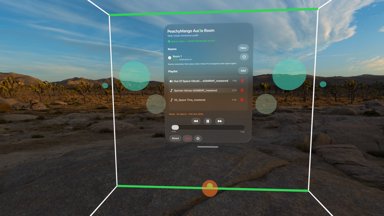
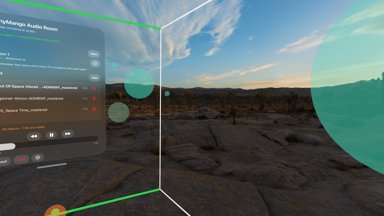
PeachyMango Audio Room turns an ADM BWF file into a room you can enter on Apple Vision Pro. Glowing spheres are the moving sound sources in the mix. Define a room in your space, hit play, and walk among them with head-tracked spatial audio. You can enable a Vision Pro Environment around you, but stay aware of your real surroundings when you move.
If you mix immersive audio, this is a way to hear your own masters as a place, not a flat file. If you just love spatial sound and can get your hands on an ADM BWF, you're invited in too.
What you need
- An Apple Vision Pro
- visionOS 26 or later
- An ADM BWF
.wavfile (immersive master, not a stream) - The app via TestFlight
Apple Music Spatial Audio streams and ordinary stereo/multichannel files do not work. The app plays ADM BWF masters you import yourself.
How it works
- Get an ADM BWF onto your Vision Pro (AirDrop, Files, iCloud Drive, whatever you use).
- In the app, open Playlist → Add and pick the file.
- Create a room: stand inside the wireframe cuboid, drag the handles, save. Rooms remember their place when Vision Pro recognizes that space again.
- Press play and walk. Spheres light up as objects speak; beds show as channel markers. You're inside the mix.
You need ADM BWF files
ADM BWF is the master format Dolby Atmos sessions export: a Broadcast Wave with Audio Definition Model metadata that describes every object and bed in the mix.
You can produce ADM BWF files from Logic Pro X via a Dolby Atmos export, and from many other Atmos and ADM tools. Get the file onto Vision Pro, then import it in the playlist.
Want more on building an Atmos-capable studio? See Dolby Atmos Studio.
Why I built this
I've spent years composing for space (quad, Ambisonics, Atmos) and I wanted a way to step into a finished master on Vision Pro the way I step into a mix in the studio. PeachyMango Audio Room is that experiment: rooms anchored in your living room, objects you can walk toward, playback that respects the ADM.
For the longer studio story, start at Dolby Atmos Studio.
FAQ
- What is ADM BWF?
- ADM BWF is a Broadcast Wave (.wav / .bwf) that carries Audio Definition Model metadata, the industry master format for describing Dolby Atmos objects, beds, and positions. PeachyMango Audio Room reads that metadata and spatializes the audio on Vision Pro.
- How do I export an ADM BWF from Logic Pro?
- In Logic Pro with a Dolby Atmos project, use the Dolby Atmos export / ADM BWF export path for your Logic version so you get a full ADM master (not just a binaural or Apple Music deliverable). Other DAWs and Atmos tools can export ADM BWF as well.
- Does Audio Room play Apple Music Atmos?
- No. Apple Music Spatial Audio is a streaming format. This app needs an ADM BWF file you import yourself.
- Is there an App Store version?
- Not yet. PeachyMango Audio Room is in public TestFlight while it is still in development.
- How do I send feedback?
- Use TestFlight's screenshot feedback. Tell me what file you tried and whether it played. That helps more than anything.
Support this work as a Patreon paid member
See also: Sonic Zen Spheres, another Vision Pro app: paint with sound in an interactive field of glowing spheres (App Store and TestFlight).
Dolby, Dolby Atmos, and the double-D symbol are trademarks of Dolby Laboratories. Apple, Apple Vision Pro, visionOS, TestFlight, and Logic Pro are trademarks of Apple Inc. PeachyMango is not affiliated with or endorsed by Dolby or Apple.